
Need assistance with our tools or job circular? Contact our editorial team or explore our FAQs for quick support.

Pension Calculator
DIGESTPRESS FINANCIAL UTILITY
Pension & Retirement Benefits Calculator
Estimate your monthly post-retirement pension, lump-sum gratuity payout, and statutory medical allowance in real time.
Estimated Net Monthly Pension
$0.00
Gross Monthly Entitlement
$0.00
Lump-Sum Gratuity Payout
$0.00
Statutory Medical Allowance
$1,500.00
Service Accrual Rate
90%
Pension & Retirement Calculator
Estimate monthly pension, gratuity and medical allowance from your inputs.
Government Pension Calculator: Estimate Monthly Pension and Gratuity
Planning for retirement involves more than knowing your final salary. Government employees also need to understand how qualifying service, pension calculations, any commuted portion of pension and applicable allowances affect their retirement income.
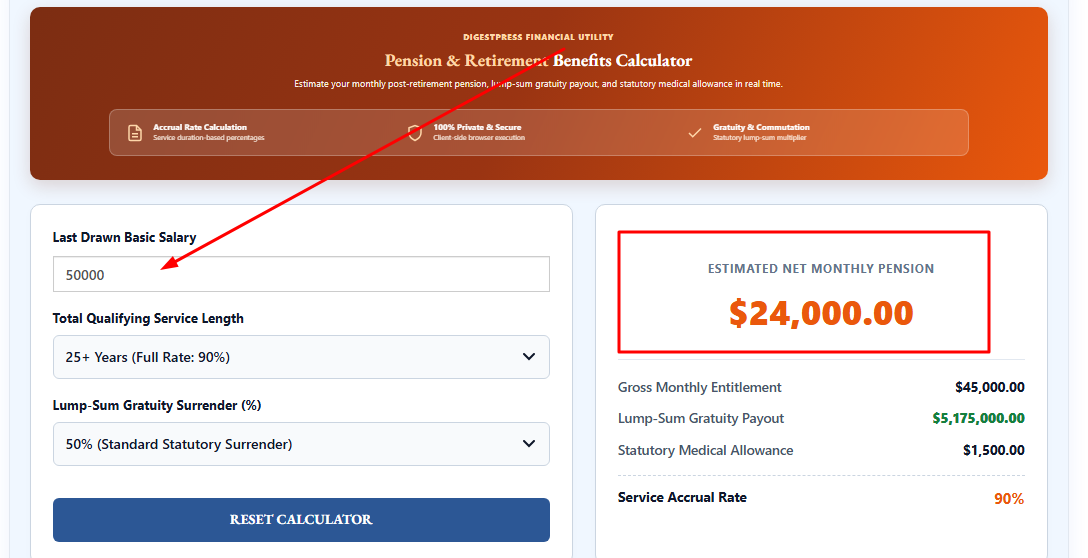
The DigestPress Pension Calculator is designed to estimate retirement-related figures using the inputs displayed on the page. These include the last drawn basic salary, qualifying service length and the percentage of pension selected for lump-sum gratuity surrender. The results area displays an estimated net monthly pension, gross monthly entitlement, lump-sum gratuity payout, medical allowance and service accrual rate.
Use these estimates to support preliminary planning, then verify the applicable rules and your personal entitlement with the relevant government pension authority.
What Does the Pension Calculator Estimate?
The calculator presents several figures that represent different parts of a retirement-benefit estimate.
- Last Drawn Basic Salary: Enter the final basic salary figure requested by the calculator. Use the amount shown in your official salary or service records.
- Qualifying Service Length: Select the applicable service duration from the available control. Use your officially recognized qualifying service, not simply the number of calendar years since you first started working.
- Lump-Sum Gratuity Surrender: Select the percentage offered by the calculator. The selected percentage can affect the split between the ongoing pension and the lump-sum amount, according to the calculation rules implemented by the tool.
The results area includes:
- Estimated Net Monthly Pension: The estimated monthly pension after the adjustments included in the tool.
- Gross Monthly Entitlement: The gross monthly pension figure displayed before the applicable deductions or adjustments represented by the calculation.
- Lump-Sum Gratuity Payout: The estimated one-time payment associated with the selected surrender percentage.
- Statutory Medical Allowance: The monthly allowance displayed by the calculator.
- Service Accrual Rate: The service-related percentage used or displayed in the calculation.
The exact meaning of each amount depends on the tool’s implementation. A displayed estimate should not be treated as an official pension sanction or a guarantee of the amount that will be paid.
Why Your Last Basic Salary Matters
The final basic salary can be an important input in a pension calculation. However, it should not automatically be confused with total take-home salary.
Gross earnings may include several components, such as house rent, medical benefits, special allowances or other payments. A pension formula may use a specific salary component rather than the total amount deposited into an employee’s bank account.
Before using the calculator, check which salary figure it requests and compare it with the relevant official records. If your final salary has changed because of a promotion, pay revision or another administrative decision, use the figure recognized for pension purposes by the relevant authority.
Understanding Qualifying Service
Qualifying service is the service period recognized under the applicable pension rules. It may differ from total elapsed employment time because particular periods can be treated differently under the relevant regulations.
For example, unpaid leave, breaks in service or other special circumstances may affect the service period recognized for pension purposes. Do not assume that every calendar year automatically counts as qualifying service.
Use your official service book or the record maintained by your department to confirm the qualifying duration. If the available calculator options do not precisely match your recognized service, do not force a selection and treat the result as definitive.
Monthly Pension and Lump-Sum Gratuity
Monthly pension and a lump-sum retirement payment serve different purposes.
Monthly pension provides recurring retirement income under the applicable scheme. It can be an important part of a retiree’s monthly budget, alongside any other eligible income.
Lump-sum gratuity or commuted value refers to a one-time payment calculated under the applicable rules. Where a scheme allows a portion of pension to be surrendered or commuted, the selected percentage and the prescribed calculation method can affect the resulting figures.
The exact relationship between the monthly pension and the lump-sum amount depends on the rules that apply to the employee. Do not assume that a percentage displayed in the calculator automatically matches the percentage permitted in every case.
How to Use the DigestPress Pension Calculator
- Open the Pension Calculator on DigestPress.
- Enter your last drawn basic salary using the figure requested by the tool.
- Select the qualifying service duration that matches your official record as closely as the available options allow.
- Select the applicable lump-sum gratuity surrender percentage, if the tool provides a suitable option for your circumstances.
- Review the displayed monthly pension estimate, gross monthly entitlement, gratuity payout, medical allowance and service accrual rate.
- Compare the output with the applicable government rules and your official service records before using the figures for retirement decisions.
If your situation does not match the available input choices, treat the result as an illustration rather than an estimate of your confirmed entitlement.
Medical Allowance and Other Retirement Benefits
The calculator’s results area includes a separate medical allowance figure. This is distinct from the pension amount and should be interpreted according to the rules implemented in the tool.
Do not assume that a displayed allowance is universally applicable or that the amount is current for every retiree. Allowances may depend on the governing scheme, applicable rules and individual eligibility.
Similarly, other retirement payments, deductions, family pension entitlements or special provisions may not be represented in the calculator. Confirm which items are included before comparing the result with an official pension statement.
Common Pension Calculation Mistakes
Using total salary instead of basic salary. If the tool asks for last drawn basic salary, entering the total salary including allowances can distort the estimate.
Overstating qualifying service. Count only the service period recognized under the applicable rules and supported by official records.
Selecting an unsuitable surrender percentage. A calculator option does not itself establish that a particular percentage is available to every employee. Verify the applicable conditions.
Assuming an allowance is fixed for everyone. Check the current rules and eligibility conditions rather than relying on a default displayed amount.
Treating the output as an official decision. A calculator cannot replace the formal review and approval process used to determine pension entitlement.
Important Limitations
The calculator produces an estimate based on its inputs and programmed calculation rules. The result may not reflect every individual circumstance, administrative adjustment, deduction or change in government policy.
Before publishing or relying on a calculation, the tool’s underlying formula should be checked against the pension rules applicable to its intended users. This is particularly important for the service accrual rate, surrender percentage, lump-sum multiplier and medical allowance.
If the calculator has not been updated for the relevant rules, its output may not match the amount determined by the pension authority. For complex cases, consult the appropriate government pension office or the relevant departmental accounts authority.
Prepare for Retirement with Better Records
A useful starting point for retirement planning is to keep your final basic salary, recognized service period and relevant pension documents organized. Comparing those records with a calculator’s assumptions can help identify discrepancies before you begin the formal retirement process.
Use the DigestPress Pension Calculator for preliminary estimates, and confirm the final pension and gratuity entitlement through the official process before making financial commitments.
Estimate Your Retirement Benefits
Review your estimated pension, gratuity and medical allowance.