
Need assistance with our tools or job circular? Contact our editorial team or explore our FAQs for quick support.

DIGESTPRESS CAREER UTILITY
Government Job Age Calculator
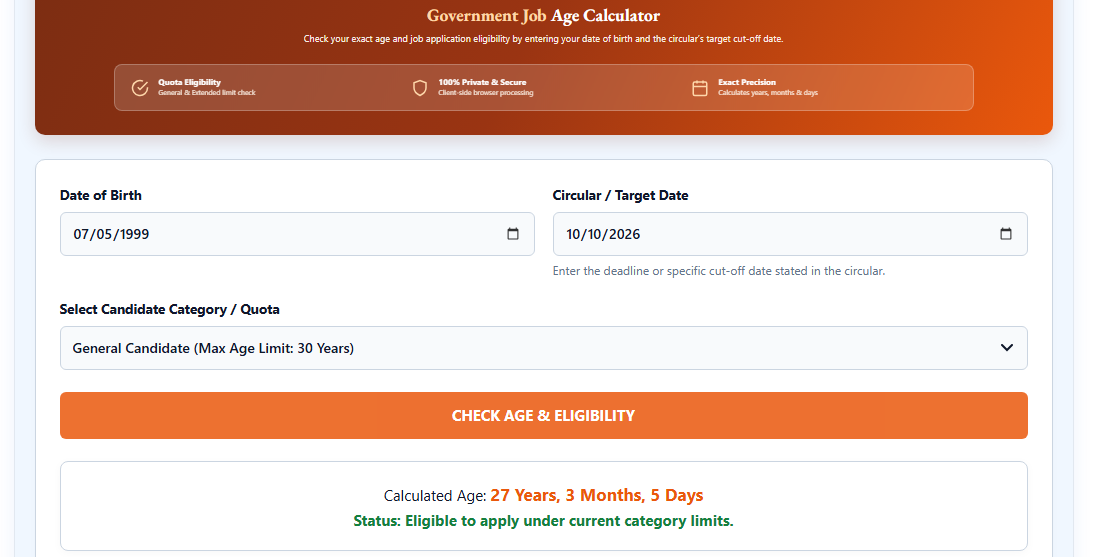
Check your exact age and job application eligibility by entering your date of birth and the circular’s target cut-off date.
Enter the deadline or specific cut-off date stated in the circular.
DigestPress Career Tools
Check Your Age for a Job Circular
Calculate your age on the circular’s specified date and compare it with your selected age limit.
Government Job Age Calculator: Check Your Age on a Circular’s Cut-Off Date
When applying for a government job, your age on the relevant date can matter just as much as your age today. A recruitment circular may specify a particular date for calculating applicants’ ages. Checking only your current age can therefore lead to an incorrect assumption about eligibility.
The DigestPress Government Job Age Calculator helps you calculate your age on a specified reference date and compare the result with a selected maximum age limit. You enter your date of birth, the circular’s cut-off or target date, and the applicable age limit to obtain a date-based calculation.
The result is a useful preliminary check, but it is not an official eligibility decision. Always confirm the requirements in the original recruitment circular.
What Is a Government Job Age Calculator?
A Government Job Age Calculator is an online tool that calculates a candidate’s age for a particular date and helps compare it with a stated age threshold.
Unlike a calculator that only reports how old you are today, this tool allows you to enter a Circular / Target Date. This is important when a recruitment authority specifies that an applicant’s age must be determined on a particular date rather than the application date or the date on which the candidate checks the result.
The DigestPress calculator displays age in completed years, months and days and compares the calculated age with the maximum age limit selected by the user. The comparison can help you identify whether your age appears to fall within the selected threshold.
However, a maximum age limit is only one part of a recruitment notice. Educational qualifications, experience, candidate-category provisions, documentation and other conditions may also affect eligibility.
How to Use the DigestPress Age Calculator
1. Enter your date of birth
In the Date of Birth field, enter the date exactly as recorded in the official documents relevant to your application.
Check the day, month and year carefully. An incorrect birth date can change the calculated age and produce a misleading result.
2. Enter the circular’s target date
Find the age-calculation date in the official recruitment circular. It may be described as an age cut-off date, reference date or another specified date.
Enter that date in the Circular / Target Date field. Do not automatically use today’s date unless the recruitment instructions specify that it is the correct reference date.
If the circular’s wording is unclear, consult the recruiting authority’s official clarification rather than guessing.
3. Select the applicable maximum age
Choose the relevant option in the Candidate Category / Maximum Age field. The selected limit is the comparison threshold used by the calculator.
Do not assume that a particular maximum age applies to every government job or every candidate category. Check the specific circular to confirm which limit and any special conditions apply to you.
4. Calculate your age and eligibility comparison
Select Calculate Age & Eligibility to view the result. Review the age calculated for the selected target date and the comparison with your chosen maximum age.
If you entered the wrong date or selected the wrong limit, correct the input and calculate again. The Reset button can be used to clear the form and start over.
Why the Circular’s Cut-Off Date Matters
A candidate’s age changes over time, but a recruitment notice may assess age as of one specific date. Using the wrong reference date can therefore produce a result that does not match the recruitment rules.
For example, suppose a candidate’s date of birth is 15 March 1995 and a recruitment circular specifies 1 January 2027 as the age-calculation date. The relevant calculation must use 1 January 2027—not the date the candidate opens the calculator.
This example illustrates the role of a reference date; it does not establish the maximum age allowed for any particular recruitment. That limit must come from the relevant official notice.
Before applying, verify three details:
- Your date of birth as recorded in the relevant official documents
- The exact date specified by the recruitment authority
- The maximum age limit and any applicable category-specific conditions
How to Read Your Age Calculation
The calculator reports the difference between your date of birth and the target date in years, months and days. These parts help you understand your completed age more precisely than subtracting one calendar year from another.
Completed years
Completed years represent the full number of years that have elapsed by the target date. If your next birthday has not yet occurred by that date, you have not completed the next year of age.
Months and days
The additional months and days show the remaining time after completed years are accounted for. They can help clarify cases where a candidate is close to a maximum age threshold.
Maximum-age comparison
The result compares your calculated age with the limit you selected. Treat this as a mathematical comparison based on your inputs, not as confirmation that the recruiting authority will accept your application.
If the circular defines age in a particular way or contains special provisions, those rules take precedence over a general calculation.
Does Meeting the Age Limit Guarantee Eligibility?
No. Meeting the selected maximum age does not automatically make you eligible for a government job.
Recruitment authorities may set requirements for education, experience, nationality, professional qualifications, candidate categories and other conditions. Some circulars may also contain specific rules about age calculation or documentary evidence.
The calculator checks the date-based age comparison. It does not replace the complete eligibility review required for a particular vacancy.
Read the full official circular and verify every condition before paying an application fee or submitting your application.
Common Age-Calculation Mistakes
Using today’s date instead of the circular date: Always enter the reference date stated in the recruitment notice.
Entering an incorrect date of birth: A one-day or one-month error can affect the result, especially when you are close to an age threshold.
Selecting the wrong maximum age: Verify the relevant limit and any applicable provisions in the official circular.
Assuming the same age limit applies to every job: Requirements can vary by recruitment, post and candidate category. Never rely on a general figure without checking the notice.
Treating the calculator result as official approval: The tool performs a calculation. The recruiting authority determines whether an application satisfies all official conditions.
A Practical Checklist Before Applying
Before you submit a government job application, make sure you have:
- Read the full official recruitment circular.
- Checked your date of birth against the relevant documents.
- Identified the exact age-calculation date.
- Confirmed the maximum age limit that applies to your situation.
- Reviewed any special category provisions stated in the notice.
- Checked educational qualifications and other eligibility requirements.
- Confirmed the application deadline and submission instructions.
If any condition is unclear, seek clarification from the recruiting authority through its official communication channels.
Use the Age Calculator Before Your Next Application
The DigestPress Government Job Age Calculator provides a convenient way to calculate your age on a circular-specific date and compare it with a selected maximum age limit. It can help you review this part of an application before moving on to the other requirements.
Use the original recruitment circular as your source of truth, enter dates carefully and treat the result as a preliminary calculation—not an official decision on eligibility.
Check Your Age for a Job Circular
Use the official cut-off date and applicable maximum age limit for your calculation.