
Need assistance with our tools or job circular? Contact our editorial team or explore our FAQs for quick support.

Online CV Builder
CAREER UTILITY TOOL
Interactive Professional CV Builder
Build, format, and download ATS-compliant professional resumes instantly with real-time document preview.
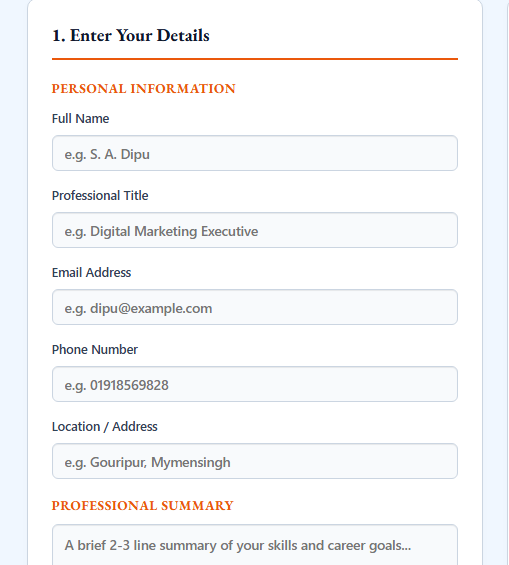
1. Enter Your Details
Personal Information
Professional Summary
Work Experience
Education
Key Skills
*Clicking download will open the print dialog. Select “Save as PDF”.
2. Live Document Preview
Your Name
Professional Title
email@example.com |
Phone Number |
Location, Country
Professional Summary
Your professional summary will appear here.
Work Experience
Your work experience details will appear here.
Education
Your educational background will appear here.
Skills
Your skills will appear here.
Online CV Builder: Turn Your Work History into a Professional CV
A CV should make it easy for an employer to understand your background, relevant experience and suitability for a role. But arranging personal details, employment history, education and skills into a clear document can take time—especially when you are applying for multiple jobs.
The DigestPress Online CV Builder helps you organize these details in one place. You can enter your information, review the document through a live preview and use the print option to save a PDF through your browser. The tool is built around a straightforward CV layout rather than complicated formatting.
Create Your CV with the Online CV Builder
Start by opening the DigestPress Online CV Builder. The form is organized into sections, allowing you to work through your information in a logical order while checking how the CV looks.
1. Add Your Contact Information
Enter your full name, professional title, email address, phone number and location. Use contact details you check regularly, since an employer may need them to arrange an interview.
Your professional title should reflect the type of work you are targeting. For example, “Junior Accountant” or “Customer Support Executive” can communicate your intended role more clearly than a vague label such as “Job Seeker.”
2. Write a Focused Professional Summary
Use the summary to introduce your professional background, strongest relevant skills and career direction. Keep it specific to the roles you want.
If you are applying for an entry-level position, you can emphasize relevant coursework, projects, internships, practical skills or volunteer experience. Do not claim professional experience or qualifications you do not have.
3. Describe Your Work Experience
List relevant roles and explain your responsibilities. Where you can support the details, include useful outcomes—for example, the number of customers you assisted, projects you completed or a process you helped improve.
If you have limited formal work experience, consider including relevant internships, placements, freelance projects or other practical experience when appropriate for the job.
4. Add Education and Key Skills
Include your relevant degrees, qualifications and academic background. For skills, prioritize abilities that match the vacancy and that you can confidently demonstrate.
Avoid adding every skill you have encountered. A shorter, relevant list is often more useful to a recruiter than an unfocused collection of keywords.
Review Your CV with Live Preview
As you enter or update information, the builder’s live preview shows how the CV is taking shape. Use this view to check the order of sections, contact details, spelling and overall readability before saving.
A quick review can help you catch common problems:
- An incorrect phone number or email address.
- Inconsistent job titles or employment dates.
- A summary that is too broad for the target role.
- Skills that do not match the vacancy.
- Missing information or unnecessary repetition.
The preview is also a useful opportunity to check whether your most relevant qualifications and experience are easy to find.
Save or Print Your CV as a PDF
When the document is ready, select Print / Save as PDF. Your browser’s print dialog should allow you to choose a PDF destination where that option is supported.
Before sharing the file, check the print preview and confirm that the text is readable, section headings are visible and no important information is cut off. The exact print controls may differ between browsers and devices.
How to Make Your CV More Relevant to a Job
Creating a CV is only part of the application process. The document should also reflect the requirements of the position.
Read the job description first. Identify the qualifications, responsibilities and skills the employer emphasizes. Then review your CV to ensure that your genuinely relevant experience is easy to identify.
Use specific descriptions. Instead of writing only “Responsible for customer service,” explain the type of support you provided or the work you handled. Add measurable outcomes only when they are accurate.
Keep the structure easy to scan. Use consistent dates, clear headings and concise descriptions. Avoid unnecessary personal details or decorative elements that make the document harder to read.
Check every version before sending it. If you tailor your CV for different vacancies, make sure the employer’s name, role title and other job-specific details are correct in each version.
Is the DigestPress Online CV Builder Suitable for Your Application?
The tool provides a simple way to organize common CV sections and review the result before printing. It may be useful for jobseekers who want a straightforward document without manually designing a layout from scratch.
However, no CV builder can guarantee an interview, selection or successful processing by every applicant-tracking system (ATS). Different employers and recruitment systems may handle files differently. Follow the employer’s file-format instructions and review the exported document before submitting it.
The tool also does not replace careful writing. You remain responsible for the accuracy of your employment history, qualifications, dates and contact information.
Frequently Asked Questions
Can I create a CV online with DigestPress?
Yes. The builder lets you enter contact information, a professional summary, work experience, education and key skills, with a live preview of the CV.
Can I save my CV as a PDF?
Use the Print / Save as PDF option and choose the PDF destination in your browser’s print dialog, where available. Review the print preview before saving.
Is the CV builder suitable for fresh graduates?
It can be useful for fresh graduates who need to organize their education, relevant projects, internships, skills and career summary. Include only experience and qualifications that accurately represent your background.
Is the CV guaranteed to pass an ATS?
No. The builder uses a straightforward single-column structure, but applicant-tracking systems vary. Follow the employer’s instructions and check that your exported document remains readable.
What information should I check before sending my CV?
Review your contact details, dates, qualifications, spelling, work history and the relevance of your skills to the vacancy. Also confirm that the saved file opens correctly and displays as expected.
Prepare Your CV Before Your Next Application
A useful CV is clear, relevant and accurate. DigestPress’s Online CV Builder gives you a place to organize your information, review the layout and prepare a printable document. Take time to check the finished CV against the job requirements before sending it to an employer.
Ready to Prepare Your CV?
Add your details, review the live preview and prepare a printable CV for your next application.