
Need assistance with our tools or job circular? Contact our editorial team or explore our FAQs for quick support.

Email Signature
DIGESTPRESS CAREER UTILITY
Professional Email Signature Generator
Create clean, clickable, and HTML-table formatted email signatures compatible with Gmail, Outlook, and Apple Mail.
Personal Information
Contact Details
Branding & Social

|
S. A. DipuDigital Publisher & Chief Editor | DigestPress
|
Paste directly into signature settings of Gmail, Outlook, or Apple Mail.
DigestPress Career Tools
A Better Email Signature Starts Here
Build a clear professional identity with useful contact details and clickable links.
Free Email Signature Generator: Create a Professional Email Signature
A professional email signature gives people a convenient way to identify you and find your contact details after reading an email. For job seekers, freelancers, business owners and office professionals, it can serve as a compact digital business card at the end of everyday correspondence.
The DigestPress Free Email Signature Generator helps you prepare an HTML-formatted signature using your professional details, contact information and optional profile links. Instead of manually arranging the same information in every email, you can enter the details once, review the generated signature and copy it for use in a supported email application.
What Makes a Professional Email Signature Useful?
A good email signature should make it easy for the recipient to recognise you and contact you when necessary. It should support your message rather than distract from it.
A practical signature usually includes:
- Full name: Use the name you normally use in professional communication.
- Job title or designation: Help recipients understand your role.
- Company or organisation: Include it when relevant to your work.
- Email address and phone number: Add accurate contact details you are comfortable sharing.
- Website: Include a relevant portfolio, company website or professional page.
- LinkedIn profile: Add your profile when it supports your professional goals.
Not every signature needs every field. A student applying for an internship, for example, may need only a name, educational or professional designation, email address and LinkedIn profile. A business representative may also need a company website and work phone number.
How to Use the DigestPress Email Signature Generator
You can create a signature by following these steps.
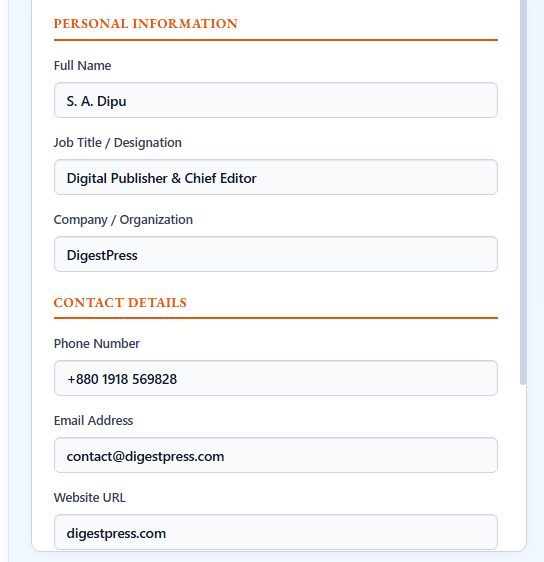
1. Enter your professional information
Open the generator and fill in the fields that apply to you: Full Name, Job Title / Designation and Company / Organization. Use the spelling and job title you want recipients to see.
2. Add your contact details
Enter your phone number, email address and website URL as appropriate. Check every character carefully, especially in email addresses and website links. A small typing error can make a contact method unusable.
3. Add optional profile and branding links
The tool includes fields for a direct Profile Image URL and a LinkedIn Profile URL. These fields are optional. If you add an image, use a valid direct image address that recipients can access. Avoid private or temporary links that may stop working later.
4. Copy the generated signature
Review the generated signature before selecting Copy Email Signature. Confirm that your name, designation and contact details are correct. If the copied result does not look right when pasted into your email application, check the source details and try again.
5. Add it to your email application
Open the signature settings in Gmail, Outlook or Apple Mail, depending on the service you use. Paste the copied signature into the appropriate field, save your settings and send a test email.
Check the test message on both desktop and mobile where possible. Email applications can render HTML differently, so confirm that the text, links and any image appear as expected.
- Title: Example of a Completed Professional Email Signature
- Alt Text: Generated professional email signature with name, job title, contact details and clickable profile links
- Description: Insert a real screenshot of a completed signature generated by the DigestPress tool. Use sample information only if it is clearly fictional, and ensure the screenshot accurately represents the tool’s actual output.
- Caption: Review the copied signature in your email application and test its links before using it for professional communication.
Email Signature Design Tips
Keep the layout concise
A signature should not compete with the email itself. Include the details recipients are most likely to need and remove redundant information. A long list of social links, multiple slogans and several phone numbers can make the signature harder to scan.
Use consistent professional details
Keep your name, designation, company name and website consistent with your CV, LinkedIn profile and other professional materials. If your role or contact information changes, update the signature as well.
Prefer readable text and useful links
A signature built with selectable text and clickable links is generally more practical than a single image containing all your information. Recipients may need to copy a phone number, follow a website link or read the details with assistive technology.
Be careful with profile images
If you use a profile image or company logo, make sure you have permission to use it and that the image is hosted at a stable, accessible URL. A broken image should not prevent recipients from finding your name or contact details.
Test before using it widely
HTML signatures do not always look identical across email clients, operating systems and screen sizes. A layout that looks correct in one application may wrap differently in another. Send a test message, click the links and check the result before using the signature for job applications or client communication.
Who Can Benefit from an Email Signature Generator?
- Job seekers: Add consistent contact details to professional correspondence with recruiters.
- Students and graduates: Present a simple signature when contacting institutions, supervisors or prospective employers.
- Freelancers: Share a portfolio or professional website with clients.
- Small business owners: Provide business contact details without manually formatting each signature.
- Office professionals: Maintain consistent details across routine work emails.
The best format depends on your role and the purpose of your messages. A signature should communicate useful information, not make claims about your qualifications or authority that you cannot support.
Privacy and Contact Information
Before adding personal information to any signature, consider who will receive your emails and whether each field is necessary. A work email address may be appropriate for business correspondence, while a personal phone number or private social profile may not be.
DigestPress describes this generator as browser-based, with client-side rendering. Even so, avoid entering sensitive information you would not want included in outgoing email. Review the final signature before copying it, and remember that recipients can forward or save messages containing your contact details.
Create Your Email Signature
Use the DigestPress Free Email Signature Generator to enter your professional details, add relevant links and copy the resulting signature. Then paste it into your email application’s signature settings and send a test message to verify the result.
For a more complete job-search toolkit, you can also try the Online CV Builder to prepare your CV, the Cover Letter Generator to organise an application letter, or the Job Application Checklist to review important application tasks before submitting your documents.
Create Your Professional Email Signature
Enter your details, review your signature and copy it for your email application’s signature settings.