
Need assistance with our tools or job circular? Contact our editorial team or explore our FAQs for quick support.

Income Tax Calculator
DIGESTPRESS FINANCIAL UTILITY
Income Tax & Rebate Calculator
Calculate your annual taxable income, progressive tax liability, and investment rebate credits in real time.
Net Payable Income Tax
$0.00
Tax-Free Threshold
$0.00
Taxable Income Base
$0.00
Gross Tax Liability
$0.00
Investment Rebate Credit
$0.00
Effective Tax Rate
0.00%
Income Tax & Rebate Calculator
Estimate annual tax, eligible investment rebate and effective tax rate.
Bangladesh Income Tax Calculator: Estimate Tax Liability and Investment Rebate
Estimating annual income tax requires more than looking at a salary figure. The applicable tax-free threshold, taxpayer category, taxable income and eligible investment rebate can all affect the final amount. The DigestPress Income Tax Calculator helps you review these figures through a single interface.
Enter the relevant annual income and investment details, select the applicable taxpayer category, and review the displayed tax summary. Use the estimate as a planning aid, then confirm the applicable rules for the relevant assessment year before preparing or submitting a tax return.
What Does the Income Tax Calculator Show?
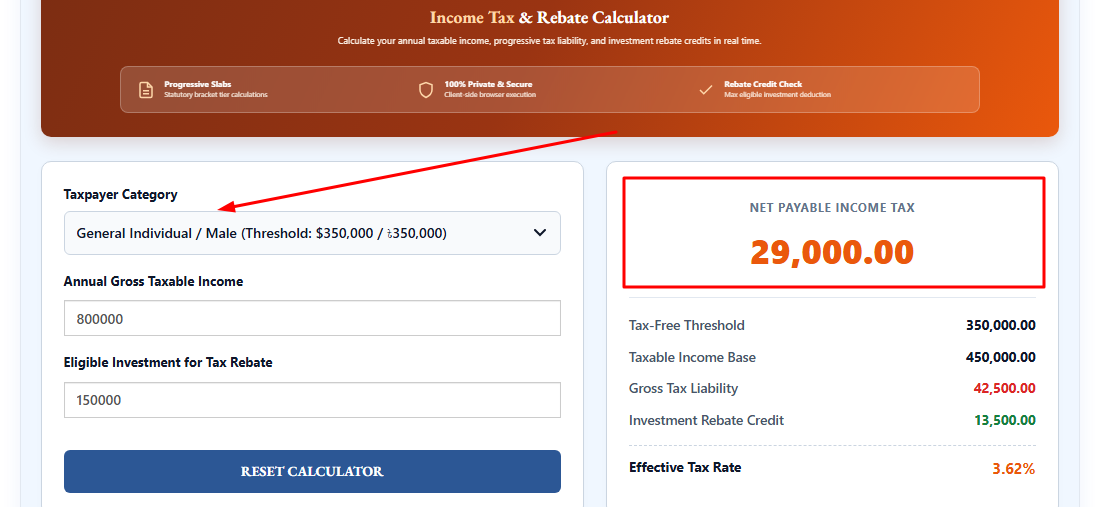
The calculator includes three main inputs and an itemized results area.
- Taxpayer Category: Select the category that applies to your circumstances from the available options. Do not choose a special category unless you meet its applicable requirements.
- Annual Gross Taxable Income: Enter the annual income figure requested by the tool. Check whether the calculator expects gross income, taxable income or another specific income measure before entering your amount.
- Eligible Investment for Tax Rebate: Enter the amount of investment that qualifies under the rules used by the calculator. Not every investment or expense necessarily qualifies for a rebate.
After you enter the details, the results area displays the following figures:
- Net Payable Income Tax: The estimated tax remaining after the displayed rebate credit is applied.
- Tax-Free Threshold: The threshold used by the calculator for the selected category.
- Taxable Income Base: The income base used for its tax calculation.
- Gross Tax Liability: The estimated tax before the displayed investment rebate credit.
- Investment Rebate Credit: The rebate amount applied in the calculation.
- Effective Tax Rate: The displayed tax burden expressed as a percentage.
The exact result depends on the values entered and the tax rules implemented in the calculator. Check that the selected taxpayer category and income figures are appropriate for your situation.
Understanding Progressive Income Tax
A progressive income tax system applies different rates to portions of income across successive tax brackets. It does not necessarily apply the highest bracket rate to every unit of income.
For example, a hypothetical tax system might tax one portion of taxable income at 5% and a higher portion at 10%. The tax on each portion is calculated separately, and the amounts are added to determine the gross tax liability before any applicable rebate or credit.
The actual tax brackets, thresholds and rates depend on the relevant jurisdiction and tax year. This illustration explains the principle only; it is not a statement of current Bangladesh tax rates.
Gross Tax Liability vs. Net Payable Tax
These two results describe different stages of a tax calculation.
Gross tax liability is the estimated tax before the investment rebate credit shown by the calculator is deducted.
Net payable income tax is the remaining estimated amount after the applicable rebate is accounted for in the calculation.
The rebate should not be confused with a direct cash payment or a guarantee of a refund. Its treatment depends on the relevant tax rules, the taxpayer’s eligibility and any limits that apply.
If the calculator displays a rebate amount, review how it relates to your eligible investment and the rules applicable to your tax year.
What Is the Effective Tax Rate?
The effective tax rate expresses the tax amount as a proportion of a specified income base. A commonly used calculation is:
Effective tax rate = Tax amount ÷ Income base × 100
The result depends on which tax amount and income base the calculator uses. For that reason, interpret the percentage alongside the calculator’s labels and methodology rather than assuming every tax calculator defines the rate in exactly the same way.
The effective rate can be lower than the marginal tax rate because a progressive system may apply lower rates to earlier portions of income.
How to Use the DigestPress Income Tax Calculator
- Open the Income Tax Calculator on DigestPress.
- Select the taxpayer category that applies to your circumstances.
- Enter the annual income amount requested by the tool.
- Enter the eligible investment amount relevant to the rebate calculation, if applicable.
- Review the tax-free threshold, taxable income base, gross tax liability, investment rebate credit, net payable tax and effective tax rate.
- Compare the output with the relevant official rules and supporting documents before relying on it for tax planning.
Use consistent income figures and confirm whether any deductions or exemptions have already been accounted for. Entering the same deduction twice, for example, can distort an estimate.
Why the Tax Year Matters
Income tax thresholds, slab rates, special taxpayer allowances and rebate rules can change. A result calculated using one year’s rules may not be appropriate for another year.
Before using an estimate for a Bangladesh tax return, confirm the relevant assessment year and check the current guidance published by the National Board of Revenue (NBR) or another competent authority where applicable.
Pay particular attention to:
- The tax-free threshold for your taxpayer category.
- The applicable progressive tax rates and income brackets.
- Eligibility requirements and limits for investment rebates.
- Any special rules, exemptions or minimum tax provisions that apply to your circumstances.
- Whether the calculator’s rules have been updated for the relevant tax year.
Do not assume that a category available in a calculator automatically establishes your legal eligibility for that category.
Common Mistakes to Avoid
Entering a monthly amount as annual income. If the calculator requests annual income, do not enter one month’s salary by mistake. Confirm the field instructions before converting a monthly figure to an annual figure.
Using the wrong taxpayer category. Special thresholds or provisions may apply only to qualifying taxpayers. Select a category only when it matches the relevant rules.
Claiming an ineligible investment rebate. An investment amount does not automatically qualify for a tax rebate. Confirm the eligible investment types, supporting documents and applicable limits.
Ignoring the assessment year. A previously correct threshold or tax rate may no longer apply. Check the relevant year’s official guidance.
Treating the estimate as an official assessment. A calculator output is not a substitute for an official tax determination, the applicable legislation or advice from a qualified tax professional when your circumstances are complex.
Important Limitations
The calculator provides an estimate based on the inputs and calculation rules implemented in the tool. Its displayed results should not be treated as confirmation that a tax return is correct or that a particular rebate is legally available.
Its accuracy depends on the correct selection of taxpayer category, the income definition used by the tool, the treatment of deductions and rebates, and whether the implemented tax rules match the relevant assessment year.
If you have multiple income sources, unusual deductions, disputed eligibility or other circumstances not represented in the interface, seek clarification from the relevant tax authority or a qualified tax professional.
Estimate Your Income Tax with DigestPress
Use the DigestPress Income Tax Calculator to review the estimated tax liability, investment rebate credit and effective tax rate for the figures you enter. Before making a filing or payment decision, verify the calculation against the applicable tax-year rules and your supporting documents.
Estimate Your Income Tax
Review your estimated tax liability, investment rebate and effective rate.