
Need assistance with our tools or job circular? Contact our editorial team or explore our FAQs for quick support.

CGPA Calculator
DIGESTPRESS CAREER UTILITY
University CGPA & GPA Calculator
Calculate your exact cumulative grade point average according to the standard 4.00 grading scale used by global universities and colleges.
Total Credits
0.00
Total Grade Points
0.00
Overall CGPA
0.00
Standard 4.00 Academic Grading Scale
DigestPress Education Tools
Calculate Your Cumulative GPA
Combine course credits and grade points to review your overall academic result.
CGPA Calculator: Calculate Your Cumulative Grade Point Average
Keeping track of your academic performance becomes more important as you complete additional semesters. Individual semester results show how you performed during one term, but your Cumulative Grade Point Average (CGPA) gives a broader view of your results across completed coursework.
The DigestPress CGPA Calculator helps you combine course credits and grade points to review your cumulative academic result. It displays total credits, total grade points and overall CGPA, allowing you to organise your calculations without repeatedly working through the arithmetic manually.
Your university’s official grading rules and academic records remain the final reference. Use the calculator to check your calculations, not to replace an official transcript or result.
What Is CGPA?
CGPA stands for Cumulative Grade Point Average. It represents academic performance across multiple courses or semesters, using grade points and the credit value assigned to each course.
A course with more credits generally contributes more to the cumulative result than a course with fewer credits. This is why simply adding semester GPAs and dividing by the number of semesters may produce an incorrect result when the semesters have different credit totals.
CGPA is commonly used to review academic progress, prepare for further study and report results in applications where a cumulative grade point average is requested. The exact grading scale and calculation rules depend on the institution.
How to Use the DigestPress CGPA Calculator
1. Start with your course or semester information
Open the calculator and review the available course and semester controls. Use the course entries to represent the credit and grade-point information you need to include in your calculation.
Keep your official transcript or result sheet available so you can enter the correct values.
2. Add courses using the quick options
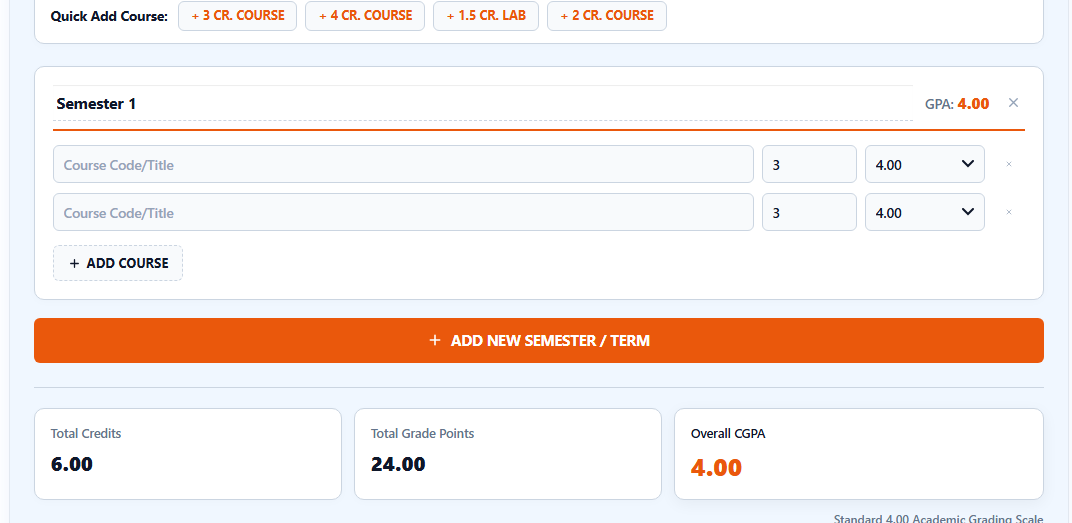
The interface includes Quick Add Course buttons for a 3-credit course, a 4-credit course, a 1.5-credit lab and a 2-credit course. Choose an option that matches the credit value of a course in your academic record.
These shortcuts are for adding course entries. They do not determine the grade you earned; you must ensure the relevant course information is correct.
3. Add another semester or term when needed
Use the Add New Semester / Term control to include another term in your calculation. Continue until you have represented all the completed coursework you want to include.
Check that you have not accidentally omitted a semester or included the same course twice.
4. Review the totals
The calculator displays Total Credits, Total Grade Points and Overall CGPA. Review these values and confirm that the included courses and credit hours match the records you intend to calculate.
If the result seems unexpected, check your inputs and the grading scale used by your institution before relying on the displayed number.
How Is CGPA Calculated?
For a credit-weighted calculation, each course’s grade point is multiplied by its credit value. The weighted grade points are then added together and divided by the total credits included in the calculation.
The general formula is:
CGPA = Total Weighted Grade Points ÷ Total Credits
For example, suppose a student has completed two courses:
| Course | Credits | Grade Point | Weighted Grade Points |
|---|---|---|---|
| Course A | 3 | 3.50 | 10.50 |
| Course B | 4 | 3.00 | 12.00 |
| Total | 7 | — | 22.50 |
The weighted average is:
22.50 ÷ 7 = 3.214285…
Rounded to two decimal places, the result is 3.21.
This is an illustrative example of the credit-weighted formula, not a result taken from the live calculator. Your institution may have specific rules for repeated courses, failed subjects, excluded credits, rounding or other academic situations.
Why Course Credits Matter
Credits indicate the relative academic weight assigned to a course. When courses have different credit values, a credit-weighted calculation gives each course an appropriate contribution to the overall result.
Consider two courses with different credit totals. A grade point earned in a four-credit course contributes more weighted grade points than the same grade point in a one-credit course.
For that reason, a simple average of course grade points may not match the official CGPA. Always use the credit values assigned by your institution.
CGPA vs GPA: What Is the Difference?
GPA generally refers to the grade point average for a particular term, semester or defined group of courses. CGPA refers to the cumulative result across the courses or semesters included in the calculation.
For example, a student may earn a GPA of 3.60 in one semester and 3.20 in another. The overall CGPA cannot necessarily be calculated by taking the simple average of those two figures. The credit totals and the institution’s calculation rules may affect the result.
Use your semester results to understand performance over time and your cumulative result to review the overall record included in the calculation.
Common CGPA Calculation Mistakes
Using a simple average instead of credit weighting
A simple average can give an incorrect result when courses have different credit values. Use the appropriate weighted calculation.
Entering the wrong credit hours
A course’s credit value affects its contribution to the total. Check your transcript or course record before entering the value.
Omitting a completed course or semester
Missing results can change the calculated total. Confirm that you have included all the coursework intended for the calculation.
Mixing different grading scales
Do not combine grade points from different grading systems without understanding how they should be converted. The DigestPress page identifies a standard 4.00 grading scale, so check your institution’s rules before using values from another scale.
Assuming the displayed result is an official transcript
An online calculator can help with arithmetic, but it does not verify your university’s records. Use the official result sheet or academic portal when an institution requests an authoritative CGPA.
Can You Use CGPA for Scholarships or Further Study?
You can use a CGPA calculation to help organise your academic information when exploring scholarships, postgraduate programmes or other educational opportunities. However, each programme may have its own eligibility criteria and document requirements.
Before applying, check the required grading scale, minimum academic result, accepted transcript format and any conversion rules stated by the institution. A calculated CGPA does not automatically establish eligibility for admission or funding.
If an application asks for an official transcript or a formally converted grade, follow those instructions instead of submitting an independently calculated figure as an official result.
How to Check Your CGPA Before an Application
Before using your result in an application, review these points:
- Confirm the course credits and grade points against your academic records.
- Include the correct courses and semesters.
- Check whether your institution uses the grading scale assumed by the calculation.
- Review any special rules for repeated, failed or excluded courses.
- Compare the calculated result with your official academic record.
- Follow the receiving institution’s instructions for reporting or converting grades.
If the calculated result differs from your official transcript, investigate the difference rather than changing the inputs simply to obtain a preferred number.
Organise Your Academic and Career Documents
Accurate academic information is useful when preparing a CV or completing an application. If you are preparing a professional document, the DigestPress Online CV Builder can help you organise your education and other career details.
For job applications, you can also review the Job Application Checklist to help organise documents and submission requirements.
The DigestPress CGPA Calculator provides a convenient way to review a credit-weighted academic calculation. For official reporting, always use the grading rules and records supplied by your educational institution.
Calculate Your Overall CGPA
Review your course credits, grade points and cumulative academic result.