
Need assistance with our tools or job circular? Contact our editorial team or explore our FAQs for quick support.

CAREER UTILITY TOOL
Job Application Quality Checklist
Verify every critical detail of your resume, cover letter, and application materials before hitting submit.
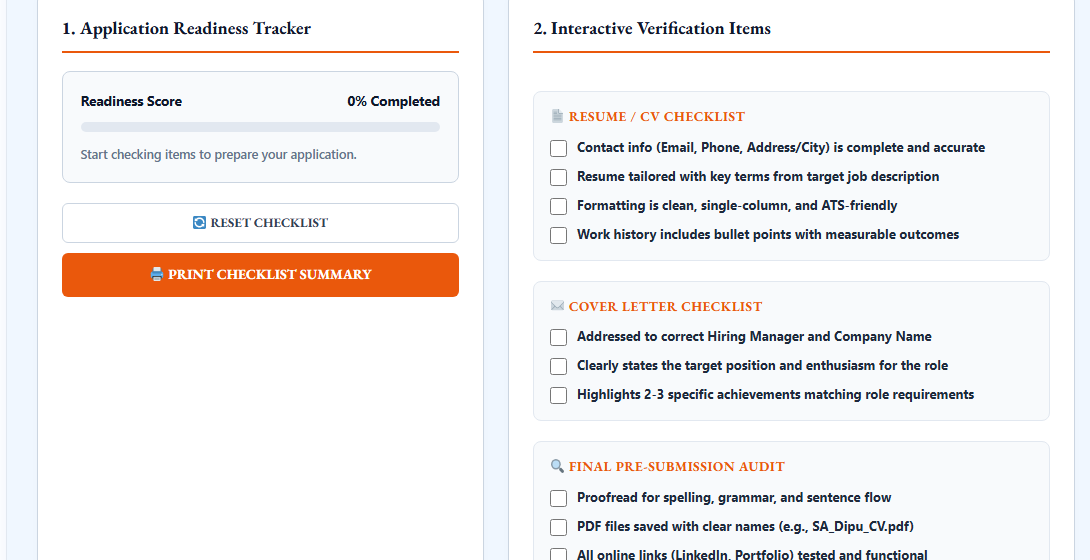
1. Application Readiness Tracker
Readiness Score
0% Completed
Check the boxes as you verify each application item.
2. Interactive Verification Items
📄 Resume / CV Checklist
✉️ Cover Letter Checklist
🔍 Final Pre-Submission Audit
DigestPress Career Utility
Job Application Quality Checklist
Review your CV, cover letter, contact details and supporting materials before submitting a job application. Use the checklist to identify unfinished tasks and prepare a more complete application.
Job Application Checklist: Review Your CV and Cover Letter Before Applying
Submitting a job application involves more than attaching a resume and clicking the Apply button. Contact details, job-specific keywords, work experience, supporting links and document formatting all deserve a final review. A small mistake can make an otherwise strong application harder for a recruiter to assess.
The Job Application Quality Checklist on DigestPress is designed around three review areas: Resume / CV, Cover Letter and Final Pre-Submission Audit. Use these sections to check your application materials systematically before sending them to an employer.
What Does a Job Application Checklist Help You Check?
A job application checklist turns a broad final review into specific tasks. Instead of relying on memory, you can review each important item and identify what still needs attention.
For a typical application, the main checks include:
- Accurate contact information
- A resume tailored to the advertised position
- Clear and relevant work experience
- A cover letter addressed to the correct employer
- Correct spelling, grammar and formatting
- Functional professional-profile and portfolio links
- Clearly named final documents
The checklist helps you review preparation tasks. It does not replace an employer’s application instructions, eligibility requirements or document-submission rules.
1. Resume / CV Checklist
Your CV should make it easy for a recruiter to understand your qualifications and relevant experience. Review the following details before submitting it.
Verify Your Contact Information
Check your email address and phone number carefully. Make sure they are current, correctly written and suitable for professional communication. Include your location or address details when relevant to the application.
A single incorrect digit in a phone number or a typo in an email address can make it harder for an employer to contact you.
Tailor Your CV to the Job Description
Read the vacancy announcement and identify the skills, qualifications and responsibilities relevant to the position. Where your actual experience supports them, use appropriate terms from the job description in your CV.
Avoid adding keywords simply to match an advertisement. Your skills, experience and qualifications should remain accurate and verifiable.
Review Formatting and Readability
Use clear headings, consistent spacing and readable fonts. A simple, well-structured layout is generally easier to scan than a crowded document with unnecessary decorative elements.
A single-column format can improve readability in many recruitment systems, but ATS compatibility depends on the employer’s software and document-processing rules. No layout can guarantee that every applicant tracking system will interpret a CV perfectly.
Check Work Experience and Achievements
Review job titles, employer names, dates and descriptions. Use concise bullet points to explain your responsibilities and achievements. When you have reliable figures, include measurable outcomes that demonstrate the scope or impact of your work.
Do not invent metrics or exaggerate your responsibilities to make your CV appear stronger.
2. Cover Letter Checklist
A cover letter should connect your experience with the specific position rather than repeat your entire CV.
Confirm the Employer and Position
Check the hiring manager’s name, company name and target position. If the correct recipient’s name is unavailable, use a suitable professional greeting instead of guessing.
Explain Your Interest in the Role
State the position you are applying for and briefly explain why your experience or interests are relevant. Keep the explanation specific to the employer and vacancy.
Highlight Relevant Achievements
Choose two or three relevant examples when you have enough evidence to support them. These might demonstrate a skill, solve a problem or show experience that matches the role’s requirements.
The purpose is to establish a clear connection between your background and the employer’s needs—not to repeat every detail from your resume.
3. Final Pre-Submission Audit
Before you submit an application, review the complete set of documents and links.
Proofread the Final Version
Read the CV and cover letter from beginning to end. Check spelling, grammar, punctuation, sentence flow, names, dates and job titles. If possible, review the documents again after taking a short break.
Make sure the final files contain the latest edits rather than an earlier draft.
Use Clear File Names
Give each document a descriptive filename. For example, YourName_CV.pdf is easier to identify than final2_new_updated.pdf.
Follow the employer’s naming and file-format instructions whenever they specify them.
Test Professional Links
Open your LinkedIn profile, portfolio or other links included in the application. Confirm that each URL works and leads to the intended page. Review the public information visible to recruiters and make sure it supports the professional image you want to present.
Confirm the Application Requirements
Read the vacancy announcement one final time. Check required qualifications, supporting documents, file formats, submission method and deadline. Some employers request additional forms, certificates, references or specific information that a general checklist cannot determine automatically.
How to Use the Job Application Checklist
- Start with the Resume / CV section and review each item against your current document.
- Move to the Cover Letter section and verify that the letter matches the correct position and employer.
- Complete the Final Pre-Submission Audit, including proofreading, file names and links.
- Mark an item only after you have checked it.
- Review the readiness score and identify any remaining tasks.
- Use the reset option when you want to start a fresh review, and the print option when you need a paper summary.
The checklist’s completion score reflects the items you have marked. It should not be treated as a prediction of whether you will be shortlisted or hired.
What a Readiness Score Can—and Cannot—Tell You
A readiness score provides a quick view of how many checklist items you have completed. It can help you notice unfinished preparation tasks, particularly when you are applying for several positions.
However, a high completion percentage does not prove that every statement in your CV is accurate or that your application meets all employer requirements. Review the actual documents and compare them with the official vacancy instructions before submitting.
Likewise, a checklist cannot guarantee ATS acceptance, an interview or a job offer. Recruiters may assess qualifications, experience, competition and role-specific requirements that are outside the checklist’s scope.
Prepare a More Complete Application
A final review is a practical way to catch avoidable mistakes before they reach an employer. Verify your contact information, tailor your CV to the position, make your cover letter specific and check every document and link.
Use the DigestPress Job Application Checklist as a structured final review, while treating the employer’s official vacancy notice as the authority for submission requirements.
Review Your Job Application Before You Submit
Check your CV, cover letter and final documents systematically. Complete the relevant review items and address anything that still needs attention.
Open Job Application Checklist