
Need assistance with our tools or job circular? Contact our editorial team or explore our FAQs for quick support.

LinkedIn Headline & Summary Generator
CAREER UTILITY TOOL
LinkedIn Headline & Summary Generator
Craft targeted, recruiter-friendly LinkedIn headlines and About summaries in real-time.
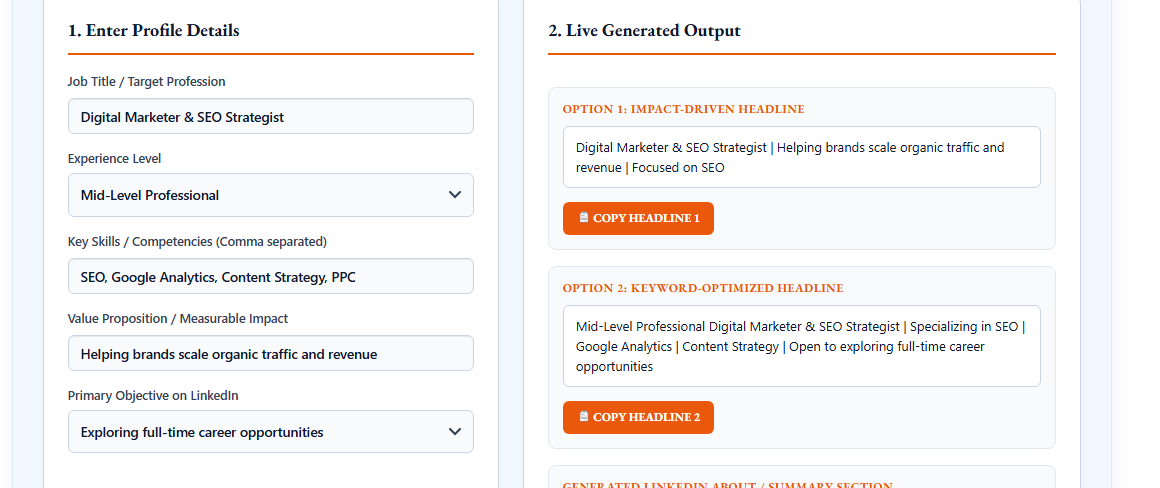
1. Enter Profile Details
2. Live Generated Output
Option 1: Impact-Driven Headline
Option 2: Keyword-Optimized Headline
Generated LinkedIn About / Summary Section
DigestPress Career Tools
Build a Clearer LinkedIn Profile
Create headline options and an About summary that reflect your real skills and career goals.
LinkedIn Headline & Summary Generator: Write a More Professional Profile
Your LinkedIn profile can help recruiters, employers, clients and professional contacts understand what you do. Two important parts of that profile are the headline and the About section. A headline gives readers a quick introduction to your professional focus, while the About section provides more context about your skills, experience and goals.
Writing these sections from scratch can be challenging, especially when you are unsure which information to prioritise. The DigestPress LinkedIn Headline & Summary Generator helps you prepare headline options and a draft About section using details about your profession, experience, skills and professional objectives.
The generated text is a starting point. Review it carefully and make sure every statement accurately represents your background before adding it to your LinkedIn profile.
What Is a LinkedIn Headline & Summary Generator?
A LinkedIn Headline & Summary Generator is an online writing tool that helps users organise professional information into profile-ready text.
The headline is the short line associated with your professional identity on LinkedIn. It can communicate your role, area of expertise, important skills or the type of work you want to pursue.
The About section gives you more room to explain your professional background, strengths, interests and direction. Unlike a list of CV entries, it can connect your experience to the value you bring to a team, organisation or client.
The DigestPress tool provides two headline options—Impact-Driven Headline and Keyword-Optimized Headline—along with a generated LinkedIn About / Summary section. Each output has a corresponding copy button.
How to Use the DigestPress LinkedIn Headline & Summary Generator
1. Enter your target profession
Start with the Job Title / Target Profession field. Use a specific, accurate title rather than a broad description where possible.
For example, “Junior Web Developer” communicates a different professional focus from “Technology Professional.” Choose the wording that best fits your current position or realistic career target.
2. Select your experience level
Choose the Experience Level that reflects your background. Your profile should not imply seniority, years of experience or expertise that you do not have.
Students, recent graduates and career changers can focus on relevant coursework, projects, transferable skills or practical experience instead of trying to sound more experienced than they are.
3. Add relevant skills
Enter your Key Skills / Competencies as comma-separated terms. Prioritise skills that relate to your target profession and that you can demonstrate through work, projects, education or other relevant experience.
For example, a digital marketing professional might list SEO, content strategy, keyword research and analytics—but only if those skills genuinely apply to their background.
A long list of unrelated skills can make a profile less focused. Select the terms that best explain the work you can do.
4. Explain your value or impact
Use the Value Proposition / Measurable Impact field to communicate what you contribute or what you want to be known for. Where possible, include a genuine achievement, project outcome or area of responsibility.
Do not invent percentages, revenue figures, client numbers or performance improvements to make the profile appear more impressive. If you do not have measurable results yet, describe your relevant strengths or the kind of work you are prepared to undertake.
5. Select your LinkedIn objective
Choose the Primary Objective on LinkedIn option that best matches your purpose. Your headline and summary should support that objective, whether you are exploring employment, developing a professional network or presenting your expertise.
6. Review both headline options
The tool provides an Impact-Driven Headline and a Keyword-Optimized Headline. Read both outputs and compare them with your actual experience and target audience.
Choose the option that sounds natural, describes your professional focus clearly and avoids exaggerated claims. You can also edit the wording after copying it.
7. Copy and refine your About summary
Review the generated LinkedIn About / Summary Section and use the Copy Summary button when you are ready. Before publishing, check the first-person voice, paragraph structure, spelling, factual accuracy and relevance to your career objective.
What Makes a Strong LinkedIn Headline?
A useful headline quickly communicates your professional identity. It should help a reader understand your focus without relying on vague claims or an excessive number of keywords.
Consider these principles when editing your generated headline:
- Be specific: Include your actual job title, profession or area of expertise.
- Use relevant keywords naturally: Choose terms that accurately describe your work and are likely to make sense to your intended audience.
- Show your focus: Where useful, mention a specialisation, industry or professional service.
- Avoid unsupported claims: Do not label yourself an expert, certified professional or industry leader unless the description is justified.
- Keep it readable: A line crowded with repeated keywords can be harder to understand than a concise, well-structured statement.
For example, a person who genuinely works in SEO might use a headline such as “SEO Specialist | Technical Audits, Keyword Research & Content Optimisation.” Adapt the wording to your own skills rather than copying an example that does not fit your experience.
How to Write a Better LinkedIn About Section
The About section should add context to your headline rather than repeat it. Use it to explain your professional direction, relevant strengths and the kind of work you do or hope to do.
Start with your professional focus
The opening should make it clear who you are professionally and what you focus on. Avoid generic introductions that could describe almost anyone.
Explain your relevant strengths
Mention a small number of relevant skills, areas of knowledge or responsibilities. Connect them to examples where possible, such as a project, internship, work assignment or academic experience.
Include genuine evidence
Specific examples help readers understand your contribution. If you have a verifiable achievement, explain what you did and what changed. If you are new to the field, discuss a relevant project or learning experience instead.
End with a clear next step
Depending on your goal, you might invite professional connections, indicate the type of opportunity you are exploring or explain the services you provide. Share contact information only if you are comfortable making it public and doing so is appropriate.
Keep the writing authentic
Read the draft aloud. Replace phrases that sound unnatural with language you would actually use. A polished summary should still sound like the person whose profile it represents.
Example: A LinkedIn Profile for an Early-Career Professional
Consider a recent graduate who has completed a web development project and is applying for junior developer roles.
A headline might read:
Junior Web Developer | HTML, CSS & JavaScript | Building Responsive Web Projects
The About section could briefly describe the graduate’s interest in web development, the technologies used in a real project and the type of entry-level role being pursued.
This example is illustrative. Use only the technologies, projects and experience that genuinely apply to your background. A candidate with a different skill set should choose a headline and summary that reflect their own qualifications.
Common LinkedIn Profile Mistakes to Avoid
Keyword stuffing: Repeating job titles and skills makes a headline difficult to read. Include relevant terms naturally.
Unsupported achievements: Never invent performance figures, certifications, client results or years of experience.
A generic About section: Statements such as “I am a hardworking and passionate individual” are more useful when supported by specific skills, interests or examples.
Copying a CV without adaptation: A LinkedIn About section can tell a connected story about your professional direction. It does not need to reproduce every CV bullet point.
Ignoring your career objective: A profile intended for recruiters may need different emphasis from one intended to attract freelance clients or build industry connections.
Publishing without proofreading: Check names, dates, job titles, links and claims before making your profile public.
Does a Keyword-Optimized Headline Guarantee Recruiter Visibility?
No. Relevant professional terms can help readers understand your expertise, but using keywords does not guarantee that your profile will appear in a particular search position or that recruiters will contact you.
Profile visibility and hiring decisions depend on multiple factors, including the relevance of your experience, the opportunity, the searcher’s criteria and information beyond your headline. Treat the generated headline as a way to communicate your professional focus—not as a promise of ranking or employment.
Prepare Your Career Documents Alongside Your LinkedIn Profile
Consistency across your professional documents makes it easier for employers to understand your background. Check that your LinkedIn job titles, dates, skills and achievements align with your CV and that neither document exaggerates your experience.
You can use the DigestPress Online CV Builder to organise your professional history. If you are applying for a specific vacancy, the Cover Letter Generator can help you prepare a separate application letter.
The LinkedIn Headline & Summary Generator is useful for developing a first draft. The strongest final version is one you have reviewed, personalised and checked against your real qualifications and goals.
Improve Your LinkedIn Profile
Create headline options and a professional summary based on your actual skills and goals.